AI website design means AI drafts the copy, the layouts, the code and the images, and runs checks, while people decide the offer, the facts and the launch. You can build with an AI website builder, with AI-assisted code in your own repository, or with an agency. A free builder plan is enough for a test page. A company site needs its own domain.
Key takeaways
- Work split: AI drafts the copy, design, code and images; people own the brief, the facts and the launch.
- Three ways: an AI website builder, AI-assisted code in your own repository, or an agency.
- Free plans: enough for a test page. The three we checked publish on the builder’s address, without your domain.
- Launch checks: main content within 2.5 seconds, a response within 200 ms, layout shift of 0.1 or less, plus schema and hreflang.
- EU rules: accessibility since 28 June 2025 for e-commerce and other consumer services, cookie consent, and GDPR notices on forms.
- Bottom line: write the facts first, choose the way by the job, and check the built pages before launch.
AI website design: the work AI does in a project
In AI website design, AI does the production work of each step. It drafts the copy, proposes layouts, writes the code, makes or edits images and runs checks on the finished pages. People write the brief, choose the offer and the facts, check every claim and approve the launch. The split stays the same with a builder, a coding agent or an agency.
A website project with AI
Updated November 2026levercrew
AI drafts each part; people own the brief and the launch
Who does what, step by step
- Brief and facts Written by people
- Copy drafts AI drafts, people edit
- Design drafts AI works in your brand
- Code and pages AI writes, people review
- Checks and launch Scripts test, a person approves
Google accepts AI content on websites. Its guidance says generative AI is useful to research a topic and to add structure to original content. It asks you to fact-check and review all AI-generated content before you publish it, including titles, meta descriptions, structured data and image alt text.
Google adds that using AI to make many pages without value for users can break its spam policy on scaled content abuse. So the brief matters more than the tool: a service page needs what you sell, to whom, where and with which proof, and a person writes that first.
Three ways to build a website with AI: builder, AI-assisted code or agency
You can build a website with AI in three ways. An AI website builder makes and hosts the site inside its own editor. With AI-assisted code, a coding agent such as Claude Code writes the site in a repository you own. An agency does the work for you, with AI for the drafts and people for the review.
Anthropic describes Claude Code as an agentic coding tool that reads your codebase, edits files, runs commands and works with your development tools. It runs in the terminal, an IDE, a desktop app and the browser, and it writes commits and opens pull requests in git. Most of its surfaces need a Claude subscription or an Anthropic Console account.
The right way follows who will change the site after launch. A team that edits pages every week without a developer keeps a builder. A team with a developer, or a marketer who works in a repository, gets more control with code. A team without time for either hires an agency and keeps the accounts.
| Question | AI website builder | AI-assisted code | Agency |
|---|---|---|---|
| Who does the work | You, in the builder’s editor and with its AI | You or a developer, with a coding agent | A team that drafts with AI and checks by hand |
| Where the site lives | On the builder’s platform | In your repository, on the host you choose | In your own accounts, if the contract says so |
| Languages and search files | What the plan offers | Any file you build: hreflang, llms.txt, schema | What the team builds and documents |
| Your time | You write, design and check each page | You direct the agent and review each change | You bring the facts and approve the pages |
| Fits best | Tests, portfolios and small one-language sites | Teams that want control of every file | Companies that want the site built and checked for them |
Free AI website builders: when a free plan is enough
A free AI website builder plan is enough when the site is a test: a page for an idea, an event or a portfolio that you share by link. It is not enough for a company site. The three free plans we checked in November 2026 publish on the builder’s own address and do not connect your domain, and Wix keeps its own branding on the free site.
Builder or code
Updated November 2026levercrew
A free builder plan fits a test, not a company site
Where seven common website jobs sit, by size and by what the site must do.
Website jobs
AI app builder
- Lead calculator
Code or agency
- Multilingual company site
Builder plan
- Campaign landing page
- Local business site
- Portfolio
- Test page for an idea
Paid builder or code
- Blog with many articles
Own domain: none of the three free plans in the table below connects one.
Read the matrix from the bottom left. A test page, a portfolio and a small local business site need few pages and no logic, so a builder plan fits. A campaign landing page needs your own domain and a form, which means a paid plan. A blog with many articles needs a paid plan or code. A lead calculator needs logic, and a multilingual company site needs many pages, languages and search files.
Plan limits change, so read the vendor’s pricing page on the day you choose. For calculators, lead tools and other small apps, our guide to Lovable alternatives by job compares the AI app builders that write the code for you.
| Builder and plan | Address on the free plan | Your own domain | Other limits the vendor names |
|---|---|---|---|
| Wix, free site | username.wixsite.com/sitename | Not on the free site | Wix branding on the site; online payments only on paid plans |
| Webflow, Starter | A webflow.io subdomain | Not on Starter | 2 static pages, 50 form submissions and a “Made in Webflow” badge; Webflow AI included |
| Framer, Free | A free Framer domain | Needs a paid plan | A monthly limit of AI credits; Framer calls the plan ideal for non-commercial use |
How to build a website with AI, step by step
To build a website with AI, start from facts, not from a prompt. Write what you sell, to whom, where and with which proof. Then plan the pages and their URLs, let AI draft the copy and the design from that brief, build the pages, run the checks and launch. A person reviews each step before the next one starts.
The order matters most in the design step. A tool that gets your logo, colours, fonts and real photos first draws your brand. With a one-line prompt, it fills every gap with the most common choice, the problem of the next section.
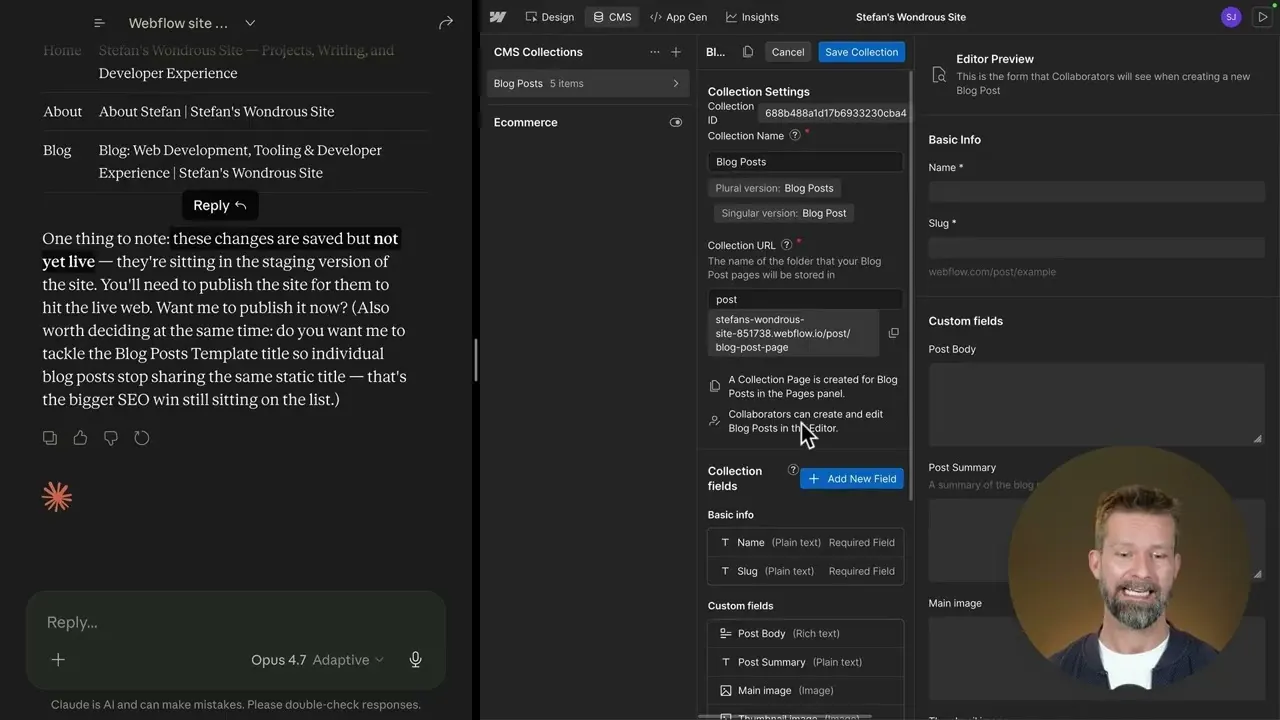
In the video below, Webflow shows Claude working on a Webflow site through Webflow MCP: it lists the pages, updates the SEO titles, adds CMS fields, applies the site’s existing styles and builds a newsletter form. The six steps follow under the video.
- Facts file: company details, services, proof and the words your buyers use, each fact written once.
- Page plan: one page per buyer question, with its URL in every language.
- Copy drafts: AI drafts each page from the facts file, and a person checks every claim.
- Design draft: the tool gets your logo, colours, fonts and real photos before it draws anything.
- Build: in a builder, AI edits pages in its editor; with code, the agent writes files you review.
- Checks and launch: speed, search files, accessibility, cookies and forms, then the domain.
AI websites that look the same: the cause and the fix
AI websites look the same because the model fills every gap in the brief with the most common choice. Anthropic wrote in November 2025 that a model asked for a landing page without guidance almost always produces Inter fonts, purple gradients on white backgrounds and minimal animation. The fix is your own brand, words and proof in the brief before any design starts.
A page from your own facts
Updated November 2026levercrew
Each zone of the page carries your own facts and words
Home page, top to bottom
End of the first screen
Anthropic calls this distributional convergence: safe design choices that offend no one fill the pages models learn from, so unguided output drifts to that middle. Its fix is a design skill, written instructions on typography, colour, motion and backgrounds that Claude loads when it builds a page.
Copy has the same problem: with no facts, you get a headline any company could use. We write the buyer, the reason to buy and the proof into the brief first, and give the tool the brand’s fonts, colours and real photos. Then we replace each line that a competitor could also put on its site.
Website checks before launch: Core Web Vitals, schema and search files
Before launch, check the built pages, not the design file. Google’s Core Web Vitals set three targets. The main content appears within 2.5 seconds (LCP), the page responds to a tap or click within 200 milliseconds (INP), and the layout shift score stays at 0.1 or less (CLS). Each target counts at the 75th percentile of page loads, on mobile and desktop.
Core Web Vitals
Updated November 2026levercrew
The main content should appear within 2.5 seconds
Largest Contentful Paint (LCP), in seconds
0 s Good 6 s
Between 2.5 and 4 seconds, LCP needs improvement.
Google says good Core Web Vitals align with what its core ranking systems seek to reward, and it highly recommends reaching them. Poor values start above 4 seconds for LCP, 500 milliseconds for INP and 0.25 for CLS.
Search files come next. Google recommends JSON-LD for structured data and the Rich Results Test to check it, and language versions need hreflang tags that point both ways. Google also calls server-side rendering or pre-rendering a great idea, because pages get faster and not all bots run JavaScript. Our free SERP preview tool shows how each title and description can look in Google.
An llms.txt file is optional. It is a 2024 proposal for a Markdown file that helps AI agents use a site, and Google says you need no AI text files or special markup to appear in AI Overviews or AI Mode. We add one because it is a small file built from the same copy as the pages.
EU rules for a new website: accessibility, cookies and forms
Three EU rules shape a new website. The European Accessibility Act covers many consumer services, e-commerce included, since 28 June 2025. Cookie rules ask for consent before cookies the site does not need to work, such as analytics or advertising cookies. The GDPR asks every form that collects personal data to say who you are and why you collect it.
The accessibility act is Directive (EU) 2019/882. It covers consumer services such as e-commerce, banking, e-books and passenger transport websites, and asks for pages people can perceive, operate and understand, and that assistive technology can read. Micro-enterprises that provide services are exempt: fewer than 10 people and no more than 2 million euros of yearly turnover or balance sheet.
In Spain, title I of Ley 11/2023 brings the act into law, in force since 28 June 2025, and adds the websites of electricity, water and gas suppliers. The four principles match WCAG 2.2, the W3C accessibility guidelines. Lighthouse runs automated audits but does not count manual checks in its score, so a person also tests with a keyboard and a screen reader.
For cookies, the AEPD guide (May 2024) says the reject option must appear at the same time, level and visibility as accept, and analytics cookies need consent. For forms, GDPR Article 13 asks for the information at the moment you collect the data. This guide is not legal advice, so check your case with a lawyer.
| Rule | What it asks of the website | Who it covers |
|---|---|---|
| European Accessibility Act, Directive (EU) 2019/882 | Pages people can perceive, operate and understand, and that assistive technology can read | Consumer services such as e-commerce and banking, since 28 June 2025; micro-enterprises that provide services are exempt |
| Ley 11/2023, Spain | The same accessibility rules in Spanish law | The same services, plus electricity, water and gas supplier websites |
| Cookie consent (Spanish LSSI, AEPD guide) | Consent before cookies the site does not need; reject at the same level as accept | Websites in Spain that use analytics, advertising or similar cookies |
| GDPR Article 13 | At the form: who you are, contact details, purpose, legal basis, recipients, how long you keep the data and the person’s rights | Every form that collects personal data |
AI website redesign: moving a site without losing Google traffic
In an AI website redesign, the redirects decide what Google keeps. Map every old URL to one new URL before the build. On launch day, add permanent server-side redirects such as 301 or 308, and keep them for at least a year. Google says a small or medium-sized site can take a few weeks for most pages to move.
A site move
Updated November 2026levercrew
Keep the redirects for at least a year after the move
From the URL map to the end of the redirects
- Before the build Map each old URL to one new URL
- Launch day Permanent redirects live and tested
- First weeks Most pages move in Google
- After 1 year Earliest end for the redirects
Google recommends moving all URLs of a small or medium-sized site at once; larger sites can move one section at a time. Its steps are to prepare the new site and the URL map, start the move with redirects and watch the traffic on old and new URLs.
AI makes the URL map faster. We give a coding agent the old sitemap and the new route list, it proposes a match for each URL, and a person checks every line where the content changed. Our website redesign SEO checklist lists what to do before, during and after launch.
Multilingual website with AI: one URL per language
A multilingual website built with AI needs one URL per language, copy written for each market and hreflang tags that link the versions. Google recommends a different URL for each language version and advises against changing the language with cookies or browser settings. AI drafts each language from the same facts file, and a native speaker checks the result.
Google lists three URL structures: country domains, subdomains and subdirectories such as /es/, which it calls easy to start and low in maintenance. Each version lists itself and every other version with hreflang, in the HTML, HTTP headers or sitemap. When the links do not point both ways, Google can ignore them.
Google also asks you to avoid automatic redirects between languages, so people and search engines see every version, and to link the other languages from each page. The x-default value names the page for visitors whose language matches no version.
Each language gets its own slugs and its own search phrases. People in Spain search for “crear página web con IA”, not for a translation of an English phrase. Our multilingual website launch playbook gives the eight steps we follow.
What to measure after launch: GA4 key events and search clicks
After launch, measure the actions that matter to the business, not only page views. In Google Analytics 4, any event can become a key event, such as a form sent, a purchase or a new account. Mark one or two as key events, record their values in the first month and read Google clicks in Search Console. Judge the new site on those numbers.
Google defines a key event as an event that measures an action that is particularly important to the success of your business. In Google Analytics, a conversion now means a key event that you share with Google Ads to measure ad campaigns.
Enhanced measurement collects some events without code: form_submit when a user submits a form, and scroll at 90% of a page. For leads, Google recommends generate_lead. Pick one main number and one check number, and record their values before launch.
| Goal | GA4 event | Mark as key event |
|---|---|---|
| Contact or quote form sent | generate_lead (recommended) or form_submit (enhanced measurement) | Yes |
| Online purchase | purchase (recommended) | Yes |
| New account | sign_up (recommended) | Yes |
| Page read to the end | scroll at 90% depth (enhanced measurement) | No, it is a reading signal |
| Click to another site | click, outbound (enhanced measurement) | Only when that click is the lead, such as a booking tool |
How LeverCrew builds websites: this site as the example
LeverCrew builds websites as code, with AI for the drafts and scripts for the checks. This website is the example. Every page is static HTML built with Astro, in English and Spanish. Before each release, scripts check the copy and every built page, and a person approves the result. You can verify each part on the live site.
Release checks on this site
Updated November 2026levercrew
A script checks every built page before each release
What the build check tests
- Page title 60 characters max
- Meta description 120 to 160 characters
- H1 heading Exactly 1 per page
- hreflang tags Each version points back Both ways
- Markdown copy Every page
- Links in the content From at least one other page Every page
One route file lists every page and its URL in each language, and the links, hreflang tags, sitemap and language switch all read from it. Each page has a canonical URL, hreflang for both languages and an x-default to English. Until a build knows the real domain, it carries noindex, so a test version cannot enter Google.
For AI assistants, the site builds an llms.txt file, a Markdown copy of every page and an AI info page with our official facts. An agent that asks for Markdown gets that copy at the same URL. The robots.txt file names AI crawlers such as GPTBot, ClaudeBot and PerplexityBot and allows them. After a deploy, a script sends the changed URLs to IndexNow, which Bing and other engines support.
A copy check blocks banned words, dashes, exclamation marks and prices. The site uses no cookies, so it has no banner, and counts visits with Vercel Web Analytics, which Vercel says works without third-party cookies. In a website and brand revamp, we build your site the same way, and most projects go live in 10 working days.
Common questions
Can AI build a website?
Yes. AI website builders make a site from a prompt in their own editor, and coding agents such as Claude Code write its code in a repository. A person still brings the facts, checks every claim and approves the launch.
Can I create a website with AI for free?
Yes, for a test. Wix, Webflow and Framer have free plans, and the ones we checked in November 2026 publish on the builder’s address without your domain. A company site needs its own domain, so it needs a paid plan, your own code or an agency.
What is the best AI website builder?
The choice follows the job. A builder plan fits a test page, a portfolio or a small one-language site. An AI app builder fits a calculator or a lead tool. A multilingual company site fits AI-assisted code or an agency. We do not rank builders.
Does Google penalize AI-generated websites?
Google does not ban AI content. It asks you to review all AI-generated content before you publish, including titles, descriptions, structured data and alt text, and warns that many AI pages without value for users can break its spam policy on scaled content abuse.
How long does it take to build a website with AI?
With LeverCrew, most website and brand revamp projects go live in 10 working days. Most of the time goes to collecting the facts and reviewing the drafts. If the site changes its domain or URLs, the redirect map comes before the build.
Do I need a cookie banner on my website?
Only if the site uses cookies it does not need to work, such as analytics or advertising cookies. In Spain, the AEPD guide asks for a reject option at the same level as accept. This website uses no cookies, so it shows no banner.
Does the European Accessibility Act apply to my website?
It applies since 28 June 2025 to consumer services such as e-commerce, banking and passenger transport websites. Micro-enterprises that provide services, with fewer than 10 people and no more than 2 million euros of turnover or balance sheet, are exempt. Check your case with a lawyer.
Sources and checks (30)
- web.dev: Web Vitals (Core Web Vitals targets and the 75th percentile)
- web.dev: Largest Contentful Paint (2.5 and 4 seconds, updated September 2025)
- web.dev: Interaction to Next Paint (200 and 500 milliseconds, updated September 2025)
- web.dev: Cumulative Layout Shift (0.1 and 0.25)
- Google Search Central: Core Web Vitals and Google search results
- Google Search Central: guidance on using generative AI content on your website
- Google Search Central: site moves with URL changes
- Google Search Central: tell Google about localized versions of your page (hreflang)
- Google Search Central: managing multi-regional and multilingual sites
- Google Search Central: introduction to structured data (JSON-LD, Rich Results Test)
- Google Search Central: JavaScript SEO basics (server-side rendering and pre-rendering)
- Google Search Central: AI features and your website
- llmstxt.org: the /llms.txt proposal (September 2024)
- Anthropic: Claude Code overview (checked November 2026)
- Anthropic: Improving frontend design through Skills (12 November 2025)
- Wix: plans and the free site (checked November 2026)
- Webflow: site plans, Starter plan limits (checked November 2026)
- Framer: plans, Free plan limits (checked November 2026)
- Directive (EU) 2019/882, the European Accessibility Act, Articles 2, 3, 4, 31 and 32 (EUR-Lex)
- BOE: Ley 11/2023, de 8 de mayo, title I on accessibility (in Spanish)
- AEPD: Guía sobre el uso de las cookies, updated May 2024 (in Spanish)
- GDPR, Regulation (EU) 2016/679, Article 13 (EUR-Lex)
- W3C: WCAG 2 overview (WCAG 2.2 and its four principles)
- Chrome for Developers: Lighthouse accessibility scoring
- Google Analytics Help: about key events
- Google Analytics Help: key events and conversions
- Google Analytics Help: enhanced measurement events
- Google Analytics Help: recommended events
- IndexNow: how it works and which search engines support it
- Vercel: Web Analytics privacy and compliance