A WhatsApp AI chatbot for bookings answers questions in the chat, offers free times from your real calendar, books the time the customer picks and sends a reminder before the date. Use the WhatsApp Business Platform (Cloud API) when the chatbot must read and write your calendar. Since 2 August 2026, the EU AI Act requires that customers know they are talking to AI.
Key takeaways
- Product: use the WhatsApp Business Platform (Cloud API) when the chatbot must read and write your calendar. The Business app suits a small team.
- Meta rules: the AI provider ban in force since 15 January 2026 targets general AI assistants, not businesses that book their own customers.
- 24-hour window: free-form replies only within 24 hours of the customer’s last message. Reminders go out as utility templates.
- Calendar: offer only times read from the live calendar, and confirm only after the calendar saves the booking.
- EU rules: opt-in before you message, a processor contract with your vendor, and the AI notice in the first message.
- Bottom line: start with one service and one calendar, test on 30 real chats, and read the handed-over chats every week.
WhatsApp AI chatbot for appointments and bookings
A WhatsApp AI chatbot for bookings is an AI agent on your business WhatsApp number. It answers questions in the customer’s own words, offers free times from your real calendar, books the time the customer picks and sends a confirmation and a reminder. A person takes the chat when the question needs one.
This guide is for service companies that take appointments, demos or quote visits on WhatsApp: clinics, workshops, academies, consultancies and B2B sales teams that book demos. A customer writes on a Sunday evening to ask for a time next week, and the answer should not wait until Monday.
The AI part changes two things. The customer can write in free text, for example “Can I move my Friday visit to next week, after five?”, and the chatbot understands it. The AI can also promise a time that is not free, unless every time it offers comes from the calendar a moment before.
This post covers the WhatsApp side of the job: which WhatsApp product to use, Meta’s rules, the calendar, reminders, handover and the EU rules. For the wider support process across email, web chat, phone and social messages, read our guide to AI customer service.
WhatsApp Business app or WhatsApp Business Platform
WhatsApp has two products for companies. The WhatsApp Business app is an app for small businesses, with a profile, greeting and away messages, quick replies, labels and a catalogue. The WhatsApp Business Platform gives developers the Cloud API, which sends and receives messages from your own software. A chatbot that reads and writes your calendar needs the platform.
The app covers a lot for a small team. You can greet new customers, answer outside opening hours with an away message and save quick replies for common questions. With Meta Verified, up to 10 devices and agents can use one account. Meta also offers its own AI agent in the app, Meta Business Agent, which learns from your website and catalogue. Meta says it is available to eligible businesses in select markets.
The platform is the route for a booking agent connected to your systems. Your software receives each message through a webhook, checks your calendar and replies through the Cloud API. You can keep the app on the same number: Meta’s coexistence option connects an existing Business app number to the Cloud API and keeps the chats in sync. Messages sent from the app stay free, and messages sent through the Cloud API follow Cloud API pricing.
| Point | WhatsApp Business app | WhatsApp Business Platform (Cloud API) |
|---|---|---|
| Who works in it | A small team on phones | Your software, a chatbot platform or a developer |
| Automatic replies | Greeting, away messages, quick replies | Any reply your software or AI agent writes |
| AI agent | Meta Business Agent, where available | Meta Business Agent or your own AI agent |
| Connects to your systems | Website and catalogue as knowledge | Any API you connect, such as a calendar |
| 24-hour customer service window | Does not apply to app messages | Free-form replies only within 24 hours |
| Cost model | Messages sent from the app are free | Meta charges per delivered message, by category and country |
Meta’s rules for AI chatbots on WhatsApp
Meta’s terms for the WhatsApp Business Platform ban AI providers from using it when a general AI assistant is the main thing they offer. A clinic, workshop or consultancy that uses AI to answer its own customers and book appointments is in a different case. As we read the terms, the ban does not stop a booking chatbot.
Section 4.7 of the terms, last modified on 23 September 2026, says AI providers may not use the platform to offer their technology “when such technologies are the primary (rather than incidental or ancillary) functionality”. Meta’s developer page dates the rule from 15 January 2026. It also lists the countries where Meta is legally required to allow general AI assistants: Spain and most other EEA countries since 11 March 2026.
Two more lines in section 4.7 matter for you. You may hire an AI provider as your Solution Provider, the company that runs the platform for you. And WhatsApp data may not be used to train or improve AI models, except to fine-tune a model for your exclusive use. Ask any vendor to confirm both points in the contract.
Meta now sells its own option too. Meta Business Agent has been a message category on the platform since 1 July 2026. It answers from your FAQs, files, catalogue and website, and its custom connectors can call your systems, for example to book appointments. Our guide to an AI chatbot for your website covers the same choice for the chat window on your site.
The 24‑hour customer service window and message templates
When a customer messages or calls your WhatsApp number, a 24-hour customer service window opens, and each new message from the customer resets it to 24 hours. Inside the window, your chatbot can send free-form replies, lists, buttons and WhatsApp Flows forms. Outside it, you can only send a template that Meta approved in advance.
Customer service window
Updated November 2026levercrew
Free-form replies run for 24 hours after the customer’s last message
Each new customer message resets the window to 24 hours.
Hours after the customer’s message
0 hours Free-form replies: 0 to 24 h 48 hours
After hour 24, only an approved template can reach the customer, for example a utility reminder.
This shapes the booking flow. The chat that books the appointment happens inside the window, so the AI can reply freely. The reminder the day before the visit usually falls outside it, so it must be a template.
Meta sorts templates into three categories: marketing, utility and authentication. Utility templates follow a user action or request and must contain nothing promotional, so a booking confirmation or a reminder for a booked visit fits there. Meta has a booking appointment template that shows the date, time, place and a View details button. Add an offer to a reminder and Meta can move the template to marketing, and it checks templates in use as well as new ones.
Pricing follows the same categories. Meta charges per delivered message, by category and by the country code of the customer’s number, and it does not charge for messages customers send you. Since 1 October 2026, service replies inside the window are charged again after a free tier of 1,000 service messages each month for each business phone number. Meta changes rates only on the first day of a quarter, so check its pricing page before you plan.
Calendar connection without double bookings
A booking chatbot avoids double bookings when it offers only times it read from the calendar a moment before, and writes the booking only after the customer confirms. It confirms to the customer only after the calendar saves the appointment. If the save fails, it says so and offers the next free time.
Booking without double bookings
Updated November 2026levercrew
Confirm only after the calendar saves the appointment
The order of one booking chat, from the question to the confirmation.
One booking
- Customer asks In their own words
- Read free times From the live calendar
- Customer picks one
- Save the booking Write to the calendar
- Confirmation sent Only after the save
If the save fails, offer the next free time. Never confirm a time the calendar did not return.
Meta’s own guide for a booking agent uses the same order. Its sample instruction tells the agent never to quote a rate or availability that did not come from a tool call, and to confirm the details with the customer before it creates a reservation. The shape is search, then book, then look up the booking later.
In Google Calendar, an appointment schedule can check your calendars for availability, add buffer time between appointments and limit bookings per day. By default it does not check co-hosts’ calendars, so add them when two people share the work. For a custom agent, the Google Calendar API’s free/busy query returns the busy times of a set of calendars, which your code checks before it offers a time.
Decide the rules before the build: appointment length per service, buffer time, how far ahead people can book, the minimum notice, and who can cancel or move a booking. Google’s appointment schedules use a 4-hour minimum lead time by default. Write them in one place, so the chatbot, the website and the team agree.
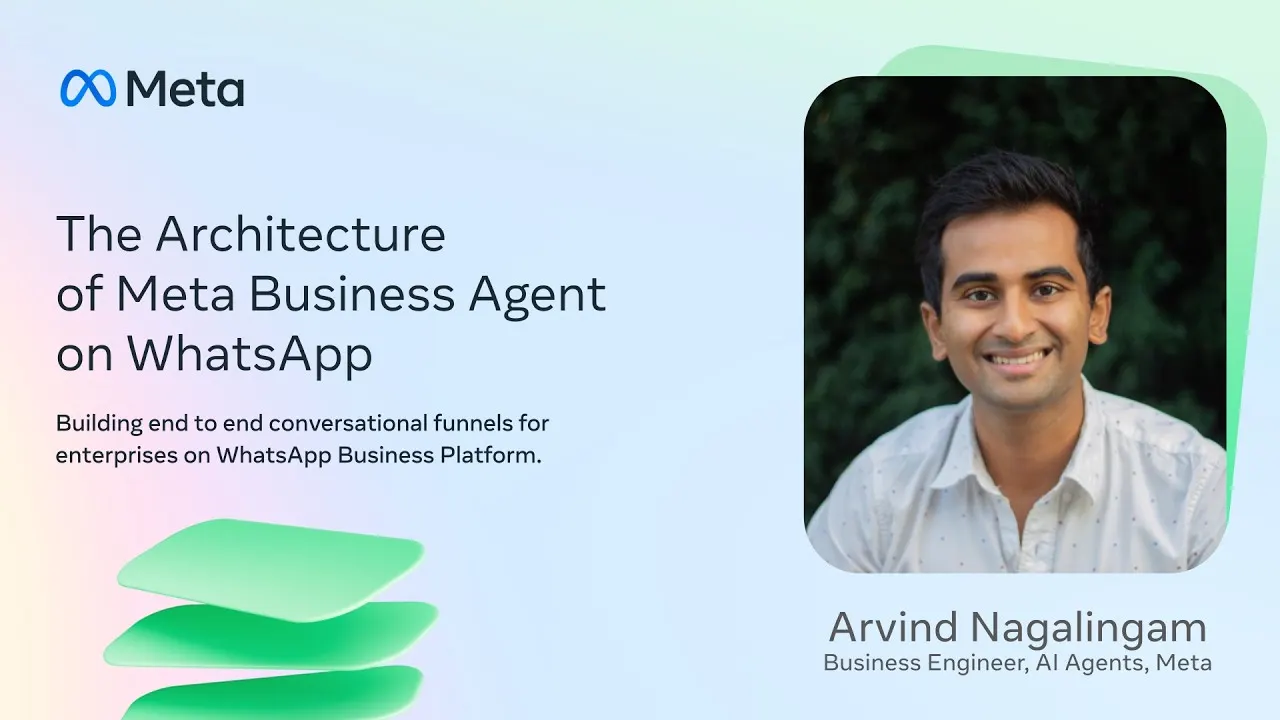
In this video, Meta’s developer team explains how its business agent is built: the entry points, the agent configuration and the messages inside the chat.
Appointment reminders and no-shows
Reminders reduce missed appointments. A Cochrane review of trials published up to August 2012 found that text message reminders raised attendance at healthcare appointments compared with no reminder: 78.6% attended with a text reminder and 67.8% with no reminder. Phone call reminders reached 80.3%. The authors rated the evidence low to moderate quality.
Reminders and attendance
Updated November 2026levercrew
Text reminders raised attendance in a Cochrane review
Share of patients who attended their appointment, by type of reminder.
Healthcare trials up to August 2012. SMS, not WhatsApp. Low to moderate quality evidence.
The review tested SMS in healthcare, so it does not promise the same numbers on WhatsApp. Measure your own result.
On WhatsApp, a reminder for a booked appointment is a utility template, because it is about a booking the customer asked for. Send one the day before, with the date, time, place and a way to move or cancel. When the customer replies, the 24-hour window opens again, and the chatbot can move the appointment in free text.
Give a cancelled time back to the calendar at once, so the chatbot can offer it to the next customer. Count no-shows per week before and after the chatbot, from the same calendar. Our AI automation ROI calculator turns the hours your team saves into a number you can compare.
Handover from the chatbot to a person
A WhatsApp chatbot passes the chat to a person when it cannot answer, when the customer asks for a person, and when the topic needs a human decision: a complaint, a refund, a health question or the price of a special job. The person sees the whole chat.
On the platform, Meta’s conversation routing decides which integration owns a chat. Meta Business Agent can be the first responder and pass chats to an escalation partner, such as the inbox tool your team uses. In the Business app, Meta says you can flag topics the agent must avoid and step in yourself at any time.
Set a clear promise for the reply. If nobody is online at night, the chatbot says when a person will answer, for example the next working morning, and books nothing it cannot confirm. Read 20 handed-over chats each week: they show which answers the chatbot is missing.
For consultancies and B2B teams that book demos, the handover is often the sales moment: the chatbot books the call, and the salesperson gets the chat history. Our page for consulting and professional services shows where we fit in that work.
Opt-in, GDPR and the AI Act notice on WhatsApp
Three sets of rules apply to a booking chatbot in Spain. Meta requires opt-in before you message people. The GDPR governs the personal data in the chat. And Article 50(1) of the EU AI Act, which applies since 2 August 2026, requires that people know they are talking to AI, unless that is obvious.
Meta’s opt-in rules say the person must have given you their mobile number and agreed to receive messages from your business, and the request must name your business. Opt-in can come from your website, a form, a call or paper. For offers, Spain’s LSSI (Article 21) also bans commercial messages by email or an equivalent electronic channel that the person did not ask for or agree to, with an exception for existing customers and similar services. Keep the booking opt-in and the marketing consent separate.
Under the GDPR, your company decides why and how the data is processed, so it is the controller. The vendor or developer that runs the chatbot for you is a processor, and its duties must be set in a contract that says what happens to the data when the contract ends. Clinics need extra care: data about health is a special category, which needs explicit consent or another condition in the GDPR. Ask for the reason of the visit only if you need it.
For the AI notice, say it in the first message, for example: “You are chatting with our AI assistant. Type PERSON at any time to talk to our team.” Article 50(5) asks for clear and distinguishable information at the latest at the first interaction. This is a summary of the rules, not legal advice.
| Message | WhatsApp category | What you need first |
|---|---|---|
| First message of the chat | Service, inside the window | The AI notice and a link to your privacy notice |
| Replies while the customer chats | Service, inside the 24-hour window | The customer wrote to you first |
| Booking confirmation | Service inside the window, or a utility template | Opt-in to messages from your business |
| Reminder the day before | Utility template | Opt-in, and no offers inside the reminder |
| Offer or newsletter | Marketing template | Marketing consent; in Spain, LSSI Article 21 |
Pilot plan and the first project
Start with one service and one calendar. Write down the questions customers ask before they book, connect the calendar, and test the chatbot on 30 real chats from your WhatsApp history before customers see it. Go live for a small group first, then for everyone.
Meta Business Agent, for example, can answer only an allow list of test customers before you turn it on for everyone. Measure four numbers each week: bookings made in the chat, chats handed to a person, wrong answers found in the review and no-shows. Compare them with the weeks before, from the same calendar.
A first project with LeverCrew starts on the free 30-minute discovery call. We look at your booking questions and your calendar, and choose with you between the Business app with Meta’s agent, a chatbot platform on the Cloud API and a custom agent. Our AI workflows and agents service builds the chatbot in your own Meta and calendar accounts. You approve the answers, the templates and the handover rules before it goes live.
Common questions
Is an AI chatbot allowed on WhatsApp Business?
Yes, for a business that uses AI to serve its own customers. Meta’s terms ban AI providers only when a general AI assistant is the main thing they offer through the platform. A clinic, workshop or consultancy that books appointments with AI is in a different case, and Meta sells its own AI agent, Meta Business Agent.
Do I need the WhatsApp Business API for a booking chatbot?
You need the WhatsApp Business Platform, which includes the Cloud API, when the chatbot must read and write your own calendar. The Business app has greeting and away messages, quick replies and, where available, Meta Business Agent. Coexistence lets you keep using the app on the same number.
Can a WhatsApp chatbot send appointment reminders?
Yes, with a utility template, because a reminder usually falls outside the 24-hour customer service window. The customer must have opted in to messages from your business. Keep offers out of the reminder, or Meta can move the template to the marketing category.
How do I stop a WhatsApp chatbot from double booking?
Offer only times the chatbot read from the live calendar a moment before, save the booking after the customer confirms, and confirm only when the calendar save works. Add buffer time, and check every calendar that shares the work, co-hosts included.
Does a WhatsApp chatbot have to say it is AI?
Yes, in the EU. Article 50(1) of the AI Act applies since 2 August 2026: people must be told they are interacting with an AI system, unless that is obvious. Article 50(5) asks for it at the latest at the first interaction, so put it in the first message.
What does WhatsApp charge for chatbot messages?
Meta charges per delivered message, by message category and by the country of the customer’s number. Messages customers send you are free, and each business phone number gets 1,000 free service messages each month. The rates are on Meta’s pricing page, and Meta can change them each quarter.
Sources and checks (20)
- Meta: Meta Terms for WhatsApp Business Platform, section 4.7 AI Providers (last modified 23 September 2026)
- Meta for Developers: pricing policy for AI Providers on the WhatsApp Business Platform (updated October 2026)
- Meta for Developers: pricing on the WhatsApp Business Platform (checked November 2026)
- Meta for Developers: service messages and the customer service window
- Meta for Developers: template categorization
- Meta for Developers: booking appointment templates
- Meta for Developers: get opt-in for WhatsApp
- Meta for Developers: onboard WhatsApp Business app users (coexistence)
- Meta for Developers: about the WhatsApp Business Platform (Cloud API, Meta Business Agent)
- Meta for Developers: Meta Business Agent, booking and reservation agent guide
- WhatsApp Business: Business app features
- WhatsApp Business: Meta Business Agent in the Business app
- Google Calendar Help: create an appointment schedule
- Google Calendar API: freebusy.query
- Cochrane: mobile phone messaging reminders for attendance at healthcare appointments (CD007458, 2013)
- European Commission, AI Act Service Desk: Article 50, transparency obligations
- European Commission, AI Act Service Desk: Article 113, entry into force and application
- European Commission: legal grounds for processing data (consent, health data, marketing)
- European Commission: application of the GDPR (controller and processor)
- BOE: Ley 34/2002 (LSSI), Article 21, consolidated text